


Arch - AI Home Design
4.3453.00 Reviews
App Specs
- Version
- 2.20.6
- Updated On
- License
- Free
- Downloads
- 1,000,000+
- Developer
- APPNATION AS
- Categories
- Art & Design
- Platform
- Android, iOS
Screenshots
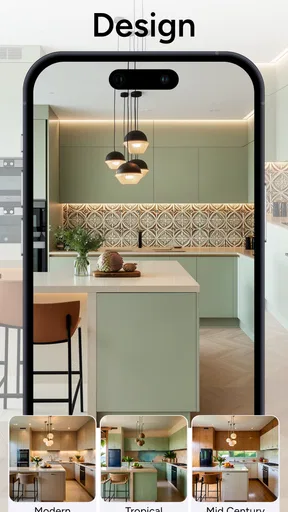
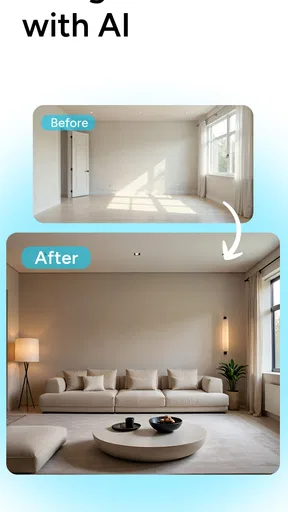
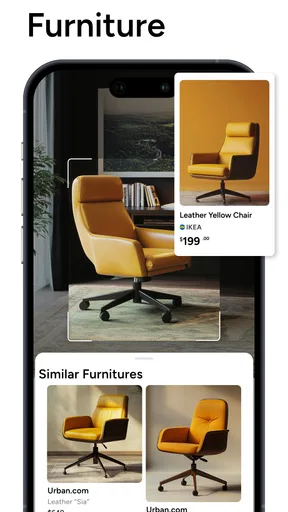
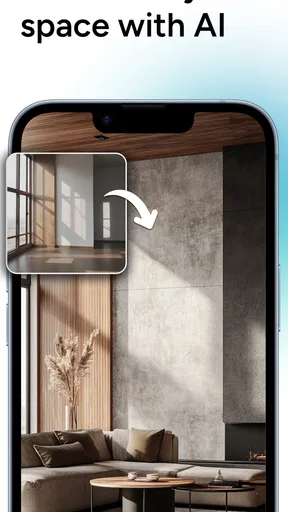
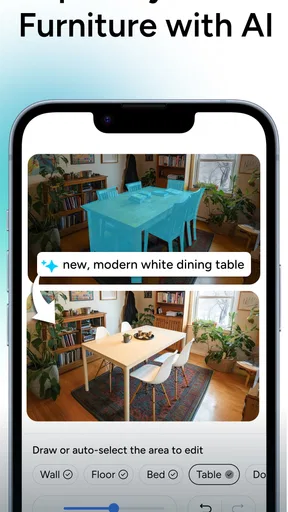
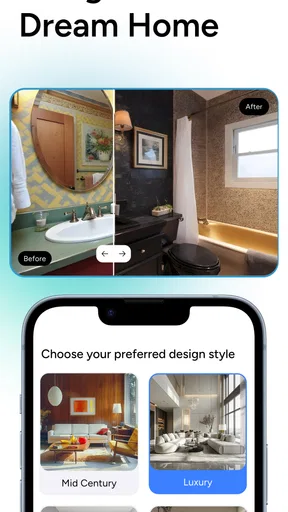
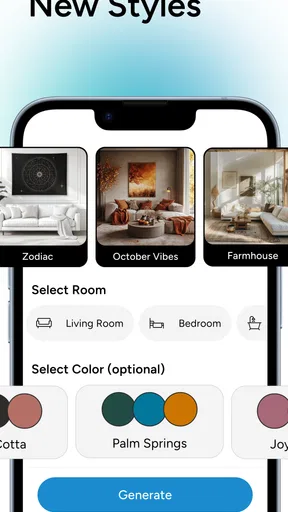

 Analysis by AppCompare
I like using a room-design app most when I have a real decision in front of me: a wall color I cannot picture, a living room that feels awkward, or a furniture change I would rather preview before buying. That is the niche Arch - AI Home Design is aiming for. It turns a photo of a room into a starting point for exploring possible looks, making it easier to move from “I wonder what would work here?” to a visual idea I can discuss or refine.
What the current app is for
Arch sits in the Art & Design space, but its appeal is practical as much as creative. I would reach for it when I want inspiration tied to my own room rather than a collection of polished interiors that may have different proportions, lighting, or furniture. It is free to install, is rated for Everyone, and is made by APPNATION AS. Its average rating is 4.4 from around 33,000 ratings, with more than a million installs, so it has attracted a sizeable audience of people curious about AI-assisted home ideas.
The app’s current version is 2.14.2, and it is available for devices running Android 8.0 or later. That gives existing users a clear point of reference when checking whether their installation is current. The version number alone does not tell me exactly what changed along the way, though, so I would treat it as a snapshot of the product today rather than evidence that a particular feature has recently been added or improved.
Turning a room photo into a design conversation
When I first stumbled upon Arch - AI Home Design, I was intrigued by its promise to revolutionize home design using AI. The download process was smooth as silk, and before I knew it, I was ready to explore. The app’s interface is sleek and intuitive, which makes it super user-friendly. Even if you’re not tech-savvy, navigating through the app feels like a breeze.
Starting with a useful photo
The first step is to upload pictures of your space. The app gives you the flexibility to snap a quick photo or upload from your gallery. Once you’ve got your images ready, the magic starts. The AI analyzes the space and generates design suggestions tailored to your style preferences, which you can set up in your profile. It’s like having a personal interior designer at your fingertips.
In practice, the photo you choose matters. I would clear the immediate area, step back far enough to show the room’s boundaries, and take the picture in even light. A crowded frame or a strong patch of sunlight can make it harder to judge the result, whether you are comparing colors or trying to imagine a different arrangement. For a narrow room, taking a second photo from the opposite end can also help me think about how the space feels from more than one viewpoint.
There is a useful distinction between using the app to explore a mood and using it to plan a purchase. A generated room can help me decide whether I prefer a calmer palette or a bolder one, but I would not treat an image as a measured floor plan. Before ordering a sofa or committing to paint, I would still check dimensions, samples, and practical details in person. That is not a failure of the app; it is the difference between visual inspiration and a reliable building plan.
Worth Reading Before You Choose

EA SPORTS FC Mobile 26 Is a Bigger Football Game, but It Takes Time

Flipboard Shows What News Apps Must Do Beyond the Feed

Switching to Android Auto Means Rethinking Your Driving Routine

Google Calendar Makes a Crowded Week Easier to Manage

Ludo King Makes the Most of the Minutes Between Plans

Baby Panda World Brings Quick Play to Modern Phones, but Its Game Library Feels Busy
What the visual tools are good at
One of the coolest features of this app is its augmented reality capability. You can virtually place furniture and decor items in your space to see how they’d actually look. It’s a game-changer, especially for those who find it hard to visualize changes. Plus, you can tweak and adjust items until it feels just right.
The most helpful way to use a placement preview is to test one decision at a time. I would compare a few possible furniture positions before changing the room’s entire style, because otherwise it becomes difficult to tell which choice made the space feel better. A virtual object can clarify whether a corner needs a lamp or whether a larger piece might dominate the view, but it cannot replace checking the real item’s measurements or walking paths.
The app also offers a vast library of design themes and furniture options. Whether you’re into minimalism, bohemian, or something in between, there’s something for everyone. The AI’s ability to suggest complementary colors and textures is pretty impressive too. It feels like it understands your vibe and enhances it.
For a more focused result, I would begin with one anchor that is already staying in the room, such as a rug, a wooden table, or a favorite color. Then I would use the suggestions to explore what could complement it. This keeps the exercise grounded in the objects and constraints I actually have, rather than chasing a beautiful but unrelated makeover. If the first output feels off, changing the photo or simplifying the style direction is often a better next step than trying to judge every detail in one pass.
A realistic way to use it at home
Imagine I am rearranging a living room over the weekend and cannot decide whether a new sofa would make the room feel too crowded. I can take a clear photo, explore design directions, and use the visual tools to compare a possible change with what is already there. I would save the most convincing idea as a reference, then measure the room and check the actual sofa dimensions before spending money. That workflow makes Arch useful as a decision aid: it narrows down what I want to investigate without pretending to settle every practical question.
It can also help when several people share a space. Instead of trying to describe a color scheme or furniture arrangement in a long conversation, I can show a visual direction and ask what feels right or wrong. The image becomes a prompt for discussion, not a final answer. That is especially handy when one person thinks in colors and another needs to see a room before forming an opinion.
Where it fits among other design options
Compared with browsing inspiration boards, Arch’s main advantage is that its starting point is a picture of my own space. Inspiration sites are better when I want to collect references from many styles or follow a designer’s work; Arch is more directly useful when I want to test an idea against a specific room. Traditional room-planning tools can be better for measured layouts and precise placement, while an AI-led app is appealing when I want quick visual exploration without building a room model from scratch.
That difference helps me decide when to open it. If I am choosing between broad styles, brainstorming a refresh, or trying to explain a look to someone else, a photo-based design app makes sense. If I need exact dimensions, a renovation sequence, construction guidance, or a catalog tied to products I can buy, I would use a dedicated planning tool or consult a relevant professional instead. Arch is most valuable early in the process, before I have committed to a detailed plan.
Personal Experience
Playing around with the app, I decided to give my living room a digital makeover. I was amazed at how accurately the app analyzed the space and suggested changes that were both stylish and practical. The AR feature allowed me to see a new couch in my room, and it fit perfectly with the existing decor. It was as if the app knew my style better than I did!
For anyone trying it for the first time, I would keep the first session simple. Choose one room, take a photo that shows the main layout, and decide what question you want the app to help answer. “Would a lighter look suit this room?” is easier to act on than “Can I redesign everything?” Once a direction feels promising, revisit the image with a specific decision in mind, such as furniture placement or color balance. That small shift helps separate a useful idea from a result that is merely attractive on screen.
Limits, cost, and who should skip it
While the app is fantastic, there are a few areas where it could improve. The loading time for rendering new designs can be a bit slow, especially when working with high-resolution images. Also, the library of furniture options, although extensive, could benefit from more diversity in terms of brands and price points.
That matters if I am comparing real products, shopping within a strict budget, or trying to match a particular retailer’s sofa. A design preview may communicate a shape or mood without guaranteeing that an identical item is available to buy. I would use the image to clarify what I like, then search separately for a product that fits my measurements and budget. Anyone who expects a complete shopping catalog or exact, build-ready instructions may find the gap frustrating.
The app is free to download, with in-app purchases ranging from $4.99 to $89.99 per item. I would explore the free experience first and only consider a purchase after I understand what it unlocks and whether it helps with a real project. That range also makes it sensible to check the purchase details before confirming anything, especially if I only want to experiment casually. For a one-time style brainstorm, paying may not be worthwhile; for someone who repeatedly uses the visual tools, the value depends on the specific options they choose.
Arch is a good fit for renters who want to picture reversible changes, homeowners gathering ideas before a refresh, and anyone who finds it difficult to imagine colors or furniture in a familiar room. I would skip it if I needed precise technical drawings, dependable dimensions, or a guaranteed match to products in a shop. It can make the early creative stage easier, but it should not be the only basis for a costly or structural decision.
What its version history can—and cannot—tell me
Seeing version 2.14.2 tells me which build to look for when checking an installation, while the app’s release date of May 29, 2023, places it on the market as an established product rather than a brand-new experiment. Those facts do not, by themselves, prove how its design tools have evolved or which changes users have received. I would separate that confirmed current snapshot from expectations: an updated version can be a reason to check the app again, but I would judge any improvement by trying the relevant workflow on my own device.
For someone who already uses Arch, the practical question is whether the current experience still suits the way they plan rooms. If an older project or saved visual direction matters, I would keep personal reference images somewhere I can access independently rather than relying on an app as the only record of a design idea. For a new user, the version number is most useful as a compatibility check; it is not a promise that every render will be faster or more accurate on every phone.
What I would watch for over time is whether the design suggestions become more helpful for ordinary rooms, whether the furniture choices feel broad enough for different tastes and budgets, and whether rendering feels responsive with detailed photos. Those are the changes that would affect my day-to-day use more than a longer list of styles. Until then, I would treat Arch as a creative sketchpad: useful for narrowing choices, less suited to making final purchasing or renovation decisions on its own.
Final Thoughts
All in all, Arch - AI Home Design is a fantastic tool for anyone looking to revamp their living spaces without committing to physical changes. It’s fun, easy to use, and provides a sneak peek into what your home could look like with just a few taps. If you’re a design enthusiast or just someone curious about how AI can enhance your home, give this app a whirl. You’ll be surprised at what it can do!
Pros
- Intuitive interface simplifies design tasks.
- Wide range of customizable design elements.
- Real-time 3D visualization is impressive.
- Easy sharing options with clients and friends.
- Regular updates with new features and fixes.
Cons
- Limited free version features.
- Requires a strong internet connection.
- High storage space needed for 3D models.
- Occasional crashes on older devices.
- Some advanced tools have a steep learning curve.
FAQs for Arch - AI Home Design
What is Arch - AI Home Design and how does it work?
Arch - AI Home Design is a cutting-edge application that uses artificial intelligence to help users visualize and design their home interiors. By inputting your room dimensions and style preferences, the app generates realistic 3D models and design suggestions, making it easy to plan renovations or redecorations with precision and creativity.
Is Arch - AI Home Design user-friendly for beginners?
Yes, Arch - AI Home Design is designed with user-friendliness in mind. It features an intuitive interface that guides users through each step of the design process. Even those with no prior experience in interior design can easily navigate the app, explore various design options, and create stunning virtual layouts.
What features does Arch - AI Home Design offer?
The app offers a range of features including 3D modeling, style suggestions, and a vast library of furniture and decor items. Users can also benefit from augmented reality capabilities, allowing them to visualize changes in real-time within their actual living spaces. This comprehensive tool helps users make informed design decisions.
Does Arch - AI Home Design require an internet connection to function?
While some features of Arch - AI Home Design, like downloading new content or accessing the most recent updates, require an internet connection, the core functionalities such as basic 3D modeling and pre-loaded design templates can be used offline. This makes it convenient for users to work on their projects anytime and anywhere.
Is Arch - AI Home Design available for both Android and iOS devices?
Yes, Arch - AI Home Design is available for download on both Android and iOS platforms. Users can find the app on the Google Play Store and Apple App Store, ensuring compatibility with a wide range of smartphones and tablets. This accessibility allows more users to enjoy the benefits of the app’s innovative design tools.


